skip to main | skip to sidebar

Java Programs and Examples with Output

Pages

  • Home
 
  • RSS
  • Twitter
Showing posts with label XSS Attacks. Show all posts
Friday, September 7, 2012

AntiSamy – A Java Solution for XSS Attacks

Posted by Admin at 12:17 PM – 0 comments
 
The increasing popularity of web applications has increased the threats and security
vulnerabilities. One such vulnerability is due to XSS or Cross-Site scripting. XSS is an attack
technique that forces web application to echo the malicious executable code supplied by
the attacker, which then loads in the results in the user’s web browser. The data supplied is
usually the HTML/JavaScript code that executes at the client side.
XSS vulnerabilities can be classified into three types – Firstly, DOM based which exists in
the clients web page, Secondly; on-Persistent or Reflected is when malicious input
supplied is displayed back onto the screen after returning back from the server. This is
most common vulnerability found in most of the web applications and finally the most
dangerous XSS vulnerability - Persistent or Second Order or Stored XSS wherein the
malicious data supplied is stored in the persistent storage or database.
Thus, there is a need to focus on handling these XSS vulnerabilities using frameworks or
open source solutions.
Threats of Cross-Site Scripting
Some of the most common threats by cross-site scripting are-
  • Inserting a script into a web page collects the user cookies which are then sent back to the attacker. This situation would be dangerous particularly in single sign-on applications 
  • Insertion of a malicious link into a well known meaningful website can cause the user clicking it to be navigated to a harmful site. 
  • XSS can cause sensitive data to be sent back to the attacker.
Solutions for handling cross-site scripting
Some of the possible solutions to handle XSS are –
  • Encoding and Decoding – Encode HTML input and alternatively decode the pre-defined tags. This ensures all the output is encoded and allows only specified tags to be included. However it is difficult to properly decode the attributes and enumerate all the required tags. 
  • Use Mark-Up languages such as BBCode – Create mark-up tags that can be decoded using Markup parsers. This ensures the required and valid tags insertion but enforces the developers to learn the language. 
  • Using XSD for validation – Create an XSD file that defines the allowable tags and HTML elements. Convert the HTML content into XML and verify the XML against the XSD. This ensures valid and allowable tag insertion and the implementation is flexible enough but an XSD needs to be created for all HTML elements and no response or error message can be given to the user. 
  • Use Open Source XSS solutions such as AntiSamy – These solutions provide APIs that can be called by the web applications. These APIs are simple to use and also provide user-friendly error messages to the user.
Introduction to AntiSamy
AntiSamy is a project by OWSAP (Open Web Application Security Project). It is an
enterprise web input validation and output encoding tool that provides us with a set of
API that can be invoked to filter and validate the input against XSS and to ensure the user
input supplied is in compliance with an application’s rules.

AntiSamy has been released to support Java and .NET applications. It is simple to use and
flexible enough and can be modified depending on the project needs. The tool uses
NekoHTML and Policy file for validating HTML and CSS inputs.

NekoHTML is a simple HTML scanner that parses HTML into XML using a parser. The policy
file consists of directives, common attributes, regular expressions, general tag attributes,
css and tag rules. It can be modified to suit the project requirements.

The input HTML supplied by the user is first parsed using NekoHTML and then validated
against the policy files. User-friendly error messages are returned back to the user.
There are four types of policy files that can however be modified to meet project
requirements. These are –
  • antisamy-slashdot.xml - This policy file strictly allows only <b>, <u>, <i>, <a>, <blockquote> HTML tags. No CSS tags are allowed. 
  • antisamy-ebay.xml – The policy file strictly emphasizes on the input containing more rich content.  
  • antisamy-myspace.xml – This policy file restricts the user from submitting Javascript.  
  • antisamy-anythinggoes.xml – This policy file allows every single HTML and CSS 
elements except Javascript and other phishing CSS tags.
Integrating AntiSamy with the web application is very simple and can be done by
following the steps below –
  • Download antisamy.jar, nekoHtml.jar and xercesImpl.jar and place them in the class-path 
  • Download the required policy file and place it in the class-path 
  • Call the API methods for scanning / filtering the user input 
AntiSamy can be integrated with a Maven application. The pom.xml entry for the same is –
<repository>
<id>wso2-maven2-repository</id>
<url>http://dist.wso2.org/maven2</url>
</repository>
<dependency>
<groupId>antisamy</groupId>
<artifactId>antisamy-bin</artifactId>
<version>1.2</version>
<scope>compile</scope>
</dependency>
<dependency>
<groupId>nekohtml</groupId>
<artifactId>nekohtml</artifactId>
<version>1.9.7</version>
<scope>compile</scope>
</dependency>
<dependency>
<groupId>xerces</groupId>
<artifactId>xercesImpl</artifactId>
<version>2.8.0</version>
<scope>compile</scope>
</dependency>

How does AntiSamy work?
The fig below describes the workflow of AntiSamy for HTML and CSS inputs

HTML / XHTML Workflow


CSS Workflow 


For instance, consider the HTML input
<body>
<p> This is a test <h1 onclick= “alert(‘malicious code’);” > for </h1>
AntiSamy </p>
</body>
The above mentioned code consists of malicious code “onclick=”alert(‘malicious code’)” “
embed in <h1> tags.
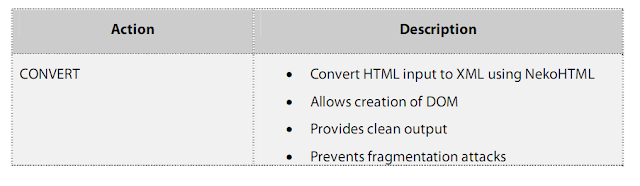
This input when filtered using AntiSamy is first cleaned using NekoHtml
The parsed input is then validated using antisamy-slashdot.xml policy file to validate and
filter the malicious code.

This input when filtered using AntiSamy returns a clean output as shown below along with
a user-friendly message.


Features
Some of the key features of AntiSamy are as listed below–
  • Simple API to use 
  • Policy files can be customized thus provides flexibility to the desired behavior  
  • Support for Maven applications 
  • User-friendly error messages are displayed. 
  • Works with broken HTML and CSS 
  • Support for other languages like ColdFusion and .NET. 
  • Internationalized error messages for English, Italian, Portuguese, Russian and Chinese.
Sample Code
Let us now create an application that uses AntiSamy for filtering the input data for XSS. Let
us create a wrapper class AntiSamyWrapper that contains scan() method to filter the input
data. The scan() of this class internally passes the input data and the policy file to the
scan() of AntiSamy.java class. This method returns an instance of CleanResults class.
The instance of CleanResults contains the clean input and error messages while filtering
the input data.
AntiSamyWrapper is a wrapper class that interacts with the AntiSamy API for validating
and filtering the input. The class returns a singleton instance when getInstance() of the
class is invoked. The scan() of the class can be called by passing the input data. The data is
passed through the API that returns the instance of CleanResults. This class contains the
error messages and clean input.


Pre-Requisites
JDK 1.4 or above
antisamy.jar – (can be downloaded from http://code.google.com/p/owaspantisamy/downloads/list ) 
AntiSamy Policy Files - (can be downloaded from
http://code.google.com/p/owaspantisamy/downloads/list )
NekoHTML.jar - (can be downloaded from http://sourceforge.net/projects/nekohtml/ )
XercesImpl-2.5.jar - (can be downloaded from http://www.ibiblio.org/maven/xerces/jars/)

Step-by-Step approach for implementing AntiSamy
  • Download antisamy.jar, nekoHtml.jar and xercesImpl.jar and place them in the class-path.  
  • Download the example policy file (antisamy-slashdot-1.3.xml) and place it in the class-path. Customize the policy file if required. 
  • Create java classes and modify the classes as mentioned below 
  • Run the class files and check the output. 
AntiSamyWrapper.java
//Add package statement 
//Import statement 
public final class AntiSamyWrapper 
{ 
 private static AntiSamyWrapper antiSamyWrapper; 
 public AntiSamy antiSamy; 
 public Policy policy; 
 public CleanResults cleanResults; 
 String policyFilePath = ; 
 String policyFileName = ; 
 private AntiSamyWrapper 
 { 
  try 
  { 
   policy = Policy.getInstance(this.getClass(). 
     getResourceAsStream(policyFilePath + 
       policyFileName)); 
  } 
  catch(PolicyException pe) 
  { 
   //Add code here to handle exceptions 
  } 
  antiSamy= new AntiSamy(); 
 } 
 /* Returns the Singleton instance of the class 
  */ 
 public static AntiSamyWrapper getInstance() 
 { 
  if(antiSamyWrapper == null) 
  { 
   antiSamyWrapper = new AntiSamyWrapper(); 
  } 
  return antiSamyWrapper; 
 } 
 public String scan(String inputString) 
 { 
  try 
  { 
   cleanResults = antiSamy.scan(inputString,policy); 
   // Add code here to handle errors by accessing method 
   // getNumberOfErrors() 
  } 
  catch(ScanException sc) 
  { 
   //Add code here to handle exceptions 
  } catch(PolicyException pe) 
  { 
   // Add code here to handle exceptions 
  } 
  return cleanResults.getCleanHTML(); 
 } 
} 

AntiSamyTest.java
///Add package statement 

//Import statement 

public class AntiSamyTest
{
 public static void main(String[] args) 
 { 
  String inputData = “ This is  a test  for AntiSamy”; 
  String cleanInput = AntiSamyWrapper.getInstance().scan(inputData); 
  System.out.println(“ Clean Output from AntiSamy -- > ”  + cleanInput); 

 }
}
Run AntiSamyTest.java class. The value for the “cleanInput” is filtered output from
AntiSamyWrapper class and the output of the program is -
Clean Output from AntiSamy -- > this is a <b> for</b>
The error message by invoking scan() of AntiSamy class is –
The body tag has been filtered for security reasons. The contents of the tag
will remain in place., The b tag contained an attribute that we could not
process. The onclick attribute has been filtered out, but the tag is still
in place. The value of the attribute was "alert&#40;&#39;hi&#39;&#41;".
This message can be viewed by adding the following code in scan() of AntiSamyWrapper
class.
cleanResults = antiSamy.scan(inputString,policy); // Existing Code
ArrayList errorList = cleanResults.getErrorMessages();
[ Read More ]
Read more...
Older Posts
Subscribe to: Posts ( Atom )

List of Java Programs

  • Java Program to check Greater between the Two Number
  • Java Program to find that given number is Palindrome or not
  • Java Program to Demonstrate the Use of Pre and Post Operator
  • Java Program to Reverse the Given Number
  • Java Program to Print Number in the Given Data Type
  • Program to Demonstrate Skipping using Continue
  • Program to find whether entered character is a vowel or Consonant
  • Java Program to Calculate the Sum of Digits of Given Number
  • How to swap two numbers using only two variables
  • Checking the Given Number is Armstrong or Not
  • Average an Array of Values
  • Display ASCII Code Instead of Character
  • Comparison of Two Variable using If
  • Printing Table In java using While Loop
  • Generate Random Number Using Math.Random Function
  • To Find roots of Quadratic Equation
  • Performing Arithmetic Opration on Two Variable
  • Concatenation of Two String in Java
  • Command Line Argument in JAVA
  • Java Hello World Program
  • Calculate Circle Perimeter | Java Program
  • Calculate the Area of Circle | Java Program
  • To Find Whether Given Year is a Leap Year or not
  • Popular
  • Recent
  • Archives

Total Pageviews

Sparkline

Followers

Popular Posts of This Week

  • Java program to create a Binary Heap and Perform various operation
    A binary heap (min-heap) is a complete binary tree with elements from a partially ordered set, such that the element at every node is less ...
  • Storing multiple values in a map using MultiMap
    Multiple values can be stored for a single key in a Map using MultiMap. Instead of a one-to-one relationship between keys and values, MultiM...
  • Stop Watch Program - To measure the amount of time to process each input
    public class Stopwatch { private final long start; public Stopwatch() { start = System.currentTimeMillis(); } ...
  • Implementation of a basic generic tree, with labels of type T - Data Structure
    // This implements a basic generic tree, with labels of type T, // pointer to the parent node, and a singly linked list of children nodes...
  • Create an Adjacency matrix Graph and perform Add and Remove operation
    import java.util.ArrayList; import java.util.ArrayList; import java.util.LinkedList; import java.util.List; import java.util.Queue; import...
  • Alphanumeric String Sorting using Java
    Alphanumeric is a combination of alphabetic and numeric characters (sometimes shortened to alphameric). In computing, the alphanume...
  • Merge-Sort Algorithm implementation in JAVA
    Merge-Sort Function void MergeSort(int low, int high) // a[low : high] is a global array to be sorted. // Small(P) is true if there...
  • Page Navigator in Java
    This component is used for navigating through records in cases where the results set is huge and records are displayed as set of records of...
  • Singly linked list with header - Data Structure
    class OrderedList { private int value; private OrderedList next; // Note: No setValue() method or setNext() methods are provide...
  • Stack implemented as array - Data Structure
    // Stack implemented as array public class ArrayStack<T> { private T[] stack; private int numElements = 0; // points to s...
Powered by Blogger.

Archives

  • ▼  2014 ( 4 )
    • ▼  August ( 4 )
      • Java program to create a Binary Heap and Perform v...
      • Create an Adjacency matrix Graph and perform Add a...
      • To Sort an Interger Array using Shell Sort
      • Sort an Integer array with Bucket Sort
  • ►  2013 ( 6 )
    • ►  August ( 1 )
    • ►  April ( 5 )
  • ►  2012 ( 673 )
    • ►  November ( 9 )
    • ►  October ( 223 )
    • ►  September ( 272 )
    • ►  August ( 2 )
    • ►  June ( 1 )
    • ►  February ( 67 )
    • ►  January ( 99 )
 

Our Blogs

  • Linux Tutorial
  • C Programming Tutorial

Labels

  • Agile Methodology ( 1 )
  • Algorithm ( 3 )
  • AntiSamy ( 1 )
  • Arithmetic Operation ( 1 )
  • Array Example ( 9 )
  • ArrayList Examples ( 11 )
  • Average an Array of Values ( 1 )
  • Barcode Example ( 1 )
  • Basic Java Programs ( 34 )
  • Bing API Example ( 2 )
  • BitSet Example ( 1 )
  • Boolean Example ( 1 )
  • Bouncy Castle API ( 1 )
  • Break Statement ( 2 )
  • BufferedReader Example ( 2 )
  • Calendar Example ( 1 )
  • Chart Generation Example ( 1 )
  • Command Line Argument ( 1 )
  • Comparator Example ( 1 )
  • Concatenation of String ( 1 )
  • Continue Statement ( 1 )
  • Control Structure ( 1 )
  • Copy File Example ( 1 )
  • CRC Example ( 1 )
  • CSV Example ( 6 )
  • Data Structure ( 5 )
  • Date Example ( 2 )
  • Directory Example ( 1 )
  • Do - While Loop Example ( 1 )
  • Domino Database ( 1 )
  • Email Example ( 8 )
  • Encryption Example ( 3 )
  • Excel Example ( 15 )
  • Factorial Example ( 1 )
  • File Upload Example ( 1 )
  • Find Roots of Quadratic Equation ( 1 )
  • FTP Example ( 2 )
  • Graph Examples ( 1 )
  • Greater between Two Numbers ( 1 )
  • GSON Library ( 1 )
  • HashMap Example ( 1 )
  • HashSet Example ( 1 )
  • Hello World Program ( 1 )
  • If Condition ( 2 )
  • Inner Class Example ( 1 )
  • iText Example ( 3 )
  • JAR File ( 1 )
  • JAVA Applet ( 1 )
  • Java Applications ( 1 )
  • Java AWT Example ( 9 )
  • Java Certification ( 1 )
  • Java Class Examples ( 15 )
  • Java Collection Example ( 1 )
  • Java Command Example ( 4 )
  • Java Constructor Examples ( 1 )
  • Java Currency Example ( 1 )
  • Java Database Example ( 3 )
  • Java Date and Time Example ( 3 )
  • Java DateFormat Example ( 3 )
  • Java Examples ( 2 )
  • Java Exception Example ( 5 )
  • Java File Example ( 22 )
  • Java GUI Example ( 1 )
  • Java Image Examle ( 3 )
  • Java Inheritance Example ( 3 )
  • Java Input Output Example ( 1 )
  • Java IO Example ( 3 )
  • Java Jar Example ( 1 )
  • Java JSON Example ( 3 )
  • Java Mail Examples ( 4 )
  • Java Map Example ( 5 )
  • Java MapReduce Example ( 2 )
  • Java MultiThreading Example ( 7 )
  • Java Network Example ( 9 )
  • Java Package ( 1 )
  • Java Programs ( 1 )
  • Java RMI ( 1 )
  • Java Robot Class Examples ( 2 )
  • Java Runtime Example ( 1 )
  • Java Swing Example ( 9 )
  • Java Util Example ( 1 )
  • Java Vector Example ( 4 )
  • Java Voice Example ( 1 )
  • Java Webservice Example ( 1 )
  • Java XML Example ( 3 )
  • Java Zip Class Examples ( 2 )
  • JDBC ( 9 )
  • JDK Version Comparison ( 1 )
  • JFrame Example ( 3 )
  • JOptionPane Dialog Example ( 1 )
  • JPanel Example ( 1 )
  • JSP Example ( 2 )
  • JSTL Example ( 1 )
  • jUnit Example ( 2 )
  • LinkedList Example ( 2 )
  • List Example ( 1 )
  • Long Variable ( 1 )
  • Lottery Nubmer ( 1 )
  • MD5 Hashing Example ( 3 )
  • Memory Management Example ( 1 )
  • Method Override ( 1 )
  • MIDI Sound ( 8 )
  • Module Operator Example ( 2 )
  • Multiplication Table ( 1 )
  • Observer Interface Example ( 1 )
  • Operator Example ( 5 )
  • Pagination ( 1 )
  • Palindrome Number ( 1 )
  • Pass By Reference Example ( 1 )
  • Pass By Value Example ( 1 )
  • PDF File Example ( 3 )
  • PDF Generation Example ( 4 )
  • Pre and Post Operator ( 2 )
  • Prime Number ( 3 )
  • Progress Bar Example ( 1 )
  • Property List Example ( 2 )
  • Random Function ( 7 )
  • Recursion Example ( 2 )
  • Regex Example ( 2 )
  • Remote Host Example ( 2 )
  • Robot Class ( 4 )
  • Searching Example ( 3 )
  • Slideshow ( 1 )
  • Sorting Example ( 7 )
  • SpringLayout Example ( 1 )
  • Stack Example ( 4 )
  • Static Variable ( 1 )
  • StreamTokenizer Example ( 2 )
  • String Example ( 19 )
  • Struts2 Example ( 1 )
  • Sum of Digits ( 1 )
  • Swap Two Numbers ( 1 )
  • Switch Case ( 3 )
  • Tapestry Components ( 1 )
  • Thumbnail Example ( 2 )
  • TimerTask Example ( 2 )
  • To Calculate Volume ( 1 )
  • To Check Armstrong Number ( 1 )
  • Tree Example ( 1 )
  • TreeMap Example ( 1 )
  • TreeSet Example ( 1 )
  • Two Dimensional Array Example ( 1 )
  • UUID ( 1 )
  • Validation Example ( 2 )
  • Variable Casting ( 1 )
  • While Loop ( 1 )
  • XML Parsing ( 7 )
  • XSS Attacks ( 1 )
  • Zip File ( 15 )

Popular Posts

  • Java program to create a Binary Heap and Perform various operation
    A binary heap (min-heap) is a complete binary tree with elements from a partially ordered set, such that the element at every node is less ...
  • To Sort an Interger Array using Shell Sort
    To Sort an Interger Array using Shell Sort class ShellSort { public static int[] shellSort(int[] array) { int N = array.length; ...
  • Implementation of a basic generic tree, with labels of type T - Data Structure
    // This implements a basic generic tree, with labels of type T, // pointer to the parent node, and a singly linked list of children nodes...
  • Java Class to Calculate the Volume of Box
    Here is a Java Class to Calculate the Volume of Box. class Box { double width; double height; double depth; // This is the con...
  • Create an Adjacency matrix Graph and perform Add and Remove operation
    import java.util.ArrayList; import java.util.ArrayList; import java.util.LinkedList; import java.util.List; import java.util.Queue; import...
  • Printing Table In java using While Loop
    Here is a Java Program to Print the Table public class Table { public static void main(String[] args) { int no = Integer.p...
  • Sort an Integer array with Bucket Sort
    Here is a java program to Sort an Integer array with Bucket Sort class BucketSort { public int[] bucketSort(int[] array) { /...
  • Merge-Sort Algorithm implementation in JAVA
    Merge-Sort Function void MergeSort(int low, int high) // a[low : high] is a global array to be sorted. // Small(P) is true if there...
  • Stack implemented as array - Data Structure
    // Stack implemented as array public class ArrayStack<T> { private T[] stack; private int numElements = 0; // points to s...
  • Performing Arithmetic Opration on Two Variable in Java
    Here is a Program to Perform the Arithmetic Operation between two Variable public class IntOps { public static void main(String[] ar...
 
 
© 2011 Java Programs and Examples with Output | Designs by Web2feel & Fab Themes

Bloggerized by DheTemplate.com - Main Blogger